Discovering Stale Agents via API
 Updated 2 months ago
by
admin
Updated 2 months ago
by
admin
Introduction
A Stale Agent is defined as a TrustLayer Agent that has not checked into the Dashboard for an extended period of time. This may be due to (but not limited to) the below reasons:
- The Agent has been deleted or uninstalled whilst not online
- The machine its installed on has been rebuilt
- The machine has not been online and/or has been powered off for an excessive period of time
The number of Agents registered within your Tenant affects your licence, so it it prudent to ensure that Stale Agents are removed.
This article shows you how you can run a Script to check for Stale Agents within your environment. There are two options available, PowerShell and Bash.
PowerShell
The script can be downloaded below:
- Get-StaleAgents.zip (PowerShell Script)
Pre-requisites
On the Windows machine you intend to run the script, you will need to have permissions to execute PowerShell scripts. You can determine if you have permissions to execute PowerShell scripts by executing the following command within PowerShell:
Get-ExecutionPolicy
If this returns the value Restricted then you will need to change your Execution Policy. For example:
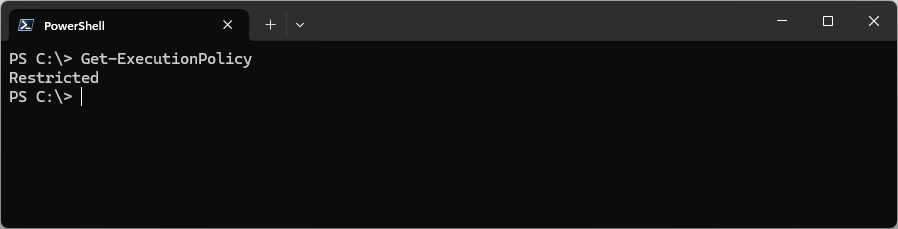
For most scenarios, the default option is recommended, which is RemoteSigned. This can be set for the local machine (as Administrator) like so:

The script is written to run on:
- Windows PowerShell 5.1
- PowerShell 7 on Windows
- PowerShell 7 on Linux
- PowerShell 7 on macOS
General requirements
- Internet connectivity on TCP port 443
- An account on the Tenant with API access.
Running the Script
It is recommended that you create a new directory to copy this downloaded PowerShell script into and to run the script within this directory. In the following example we are using the directory C:\temp on a Windows 11 machine.
With the PowerShell script in the present working directory, we can execute it with the .\Get-StaleAgents.ps1 command, for example:
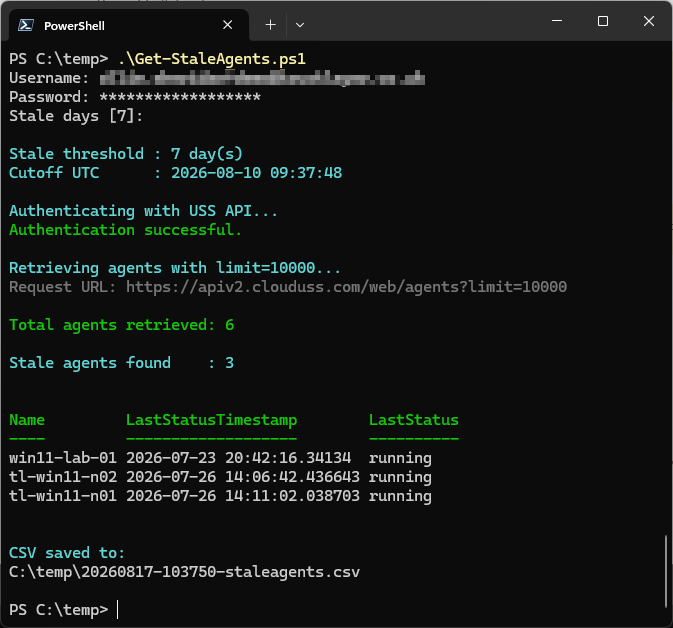
In the above example, we have provided interactively the Username and Password for the account and accepted the default 7 for the number of Stale days. You can change this to a longer duration, depending on your requirements (for example 60 days may be more appropriate).
The output advises us of the number of Total agents retrieved (6 in this example), the number of Stale agents found (3 in this example) and then displays them as a Table with columns for Name, Last Status Time Stamp and the Last Status.
This also writes a CSV file into the present working directory (in our example this is C:\temp\20260817-103750-staleagents.csv) which you may wish to retain for your records. The filename is unique for the time of execution and is in the format Year, Month, Day, Hour, Minute, Second. In our example this CSV filename indicates that it was created on 17th August 2026 at 10:37:50.
Additional Options
Other options are documented within the script, to view them execute Get-Help .\Get-StaleAgents.ps1.
Bash
The script can be downloaded below:
- stale-agents.zip (Bash Script)
Pre-requisites
In order to run this script, you will require the following:
- A physical or virtual Linux machine (Ubuntu recommended, or Windows Subsystem for Linux) with the following utilities installed:
curl: a command-line utility for transferring data to or from servers using protocols such as HTTP, HTTPS, FTP, and SFTP. This is used for the script to communicate with the TrustLayer API.jq: a command-line tool for processing, filtering, and transforming JSON data.
- Internet connectivity on TCP port 443
- An account on the Tenant with API access.
If your Linux Machine does not have these pre-requisites installed, on Ubuntu you can install them with the following commands:
$ sudo apt update
$ sudo apt install jq curl
Preparing the script
After downloading the script, you will need to edit it to allow it to run within your environment. There are two lines to edit, those starting with USERNAME and PASSWORD respectively. By default, they appear as follows:
USERNAME="${USERNAME:?Set USERNAME}
PASSWORD="${PASSWORD:?Set PASSWORD}"
For example, if you have a user called stale-agents@example.com with the password YuPfY4h2XwYVfw#F, your script should be edited as follows:
USERNAME="stale-agents@example.com"
PASSWORD="YuPfY4h2XwYVfw#F"
With these edits made, you should save your changes.
Once you have saved your changes, you will need to mark the script as executable with the following command:
chmod u+x ./stale-agents.sh
You are now ready to run the script.
Running the script
With the script in your working directory, you can run the script with the following command:
./stale-agents.sh
If there is no output, then there are no Stale Agents within your environment. Below is an example of output for Stale Agents being present:
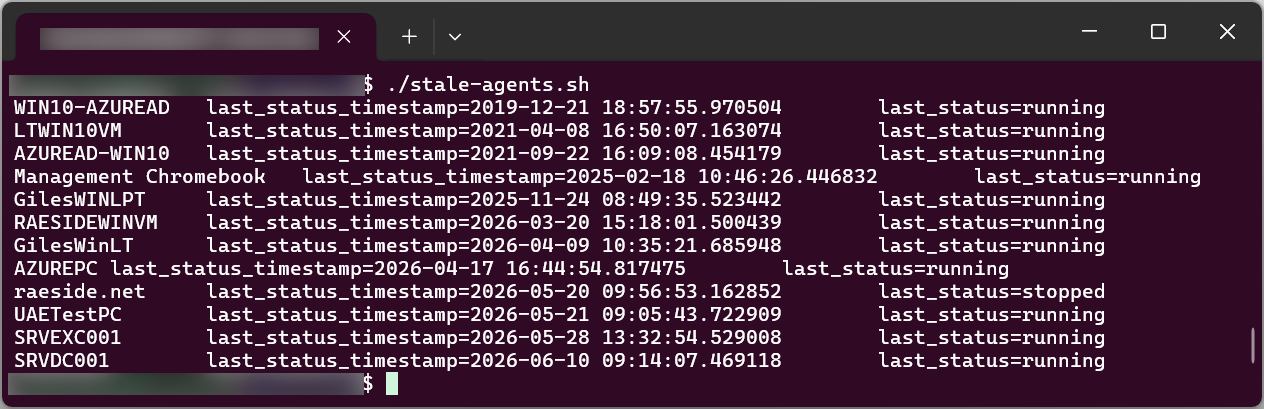
After reviewing this information, you can now safely remove clients that you are no longer using.