Licenses - Console
 Updated 2 weeks ago
by
admin
Updated 2 weeks ago
by
admin
Use the Licenses tab to quickly and easily see which modules are licensed to you, and their current status.
To review your current licenses, In the console, click Settings (the cog icon at the bottom of the left-hand menu) and open the Licenses tab. The summary at the top shows how many licences are active. Click Export CSV to download the list.
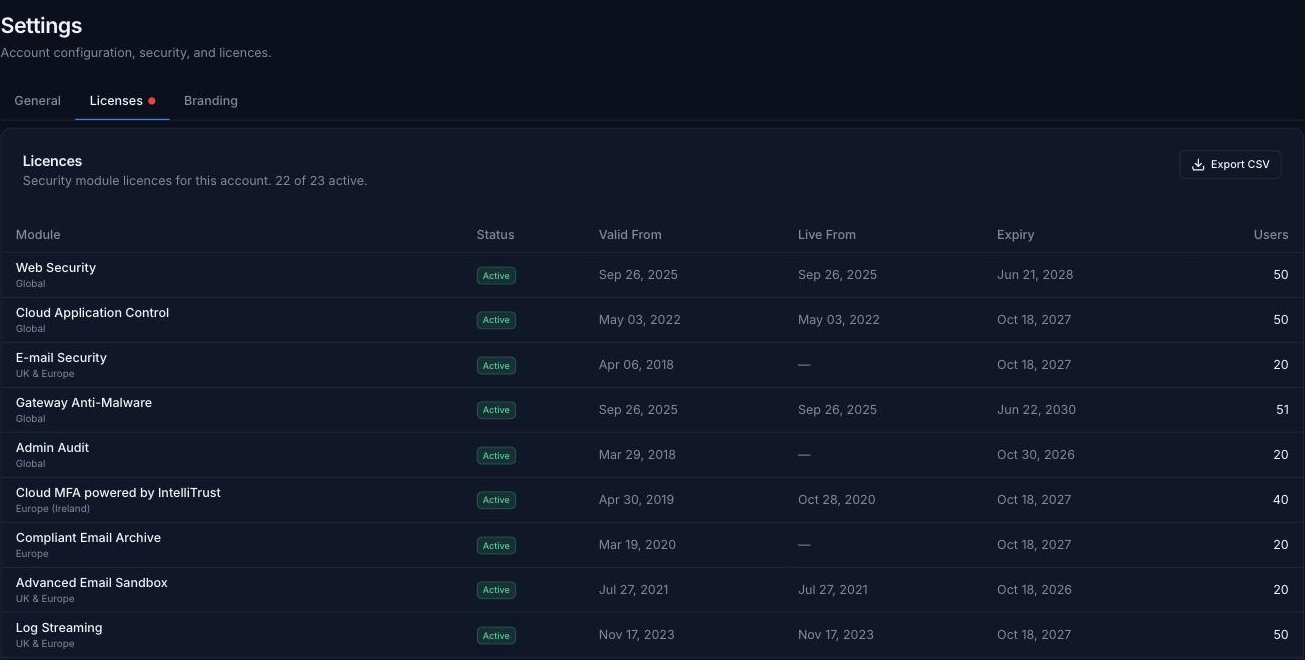
Module
The name of the licensed module. The region the module uses is shown underneath (for example Global or UK & Europe). See Global Web Filtering Coverage.
Status
Whether the licence is Active or Expired.
Valid From
The start date of your licence.
Live From
The date the module went live on your account.
Expiry
The expiry date of your current licence. Once a licence has expired, that module will no longer be accessible from the console. Please contact your Service Provider to re-license the module.
Users
The maximum number of users covered by your licence.