Roles (RBAC) - Console
 Updated 5 days ago
by
admin
The following administrator user Roles are supported:
- Super User - full access to all dashboard capabilities
- Agent Installer - restricted user capable of installing endpoint agents, AD Connect agent and gateway virtual machines
- End User - access to the personal quarantine, personal safe/deny lists and personal reporting.
- Admin - Web - Web Security product administrator only
- Admin - Email - Email Security product administrator only
- Admin - Cloud App Security - Cloud App Security product administrator only
- Admin - MFA - MFA product administrator only
- Admin - Partner - ability to provision new accounts and manage licenses only (requires partner level account)
- Admin - Web + Email Security - the ability to administer both Web and Email Security products
- Admin - Web + Cloud App Security - the ability to administer both the Web and Cloud App Security products
- Admin - Web + Cloud App + Reports Viewer - the ability to administer both the Web and Cloud App Security products and view the associated reports
- Admin - Email Quarantine + Reports Viewer - the ability to administer the Global Quarantine and view Email Security reports
- Email - Quarantine Admin - ability to manage the Global Quarantine only
- Web - URL Admin - ability to manage Custom URL categories only
- Web & Email - URL + Quarantine - ability to manage Custom URL and Email Quarantine only
- Report Viewer - ability to view reports for all products
- Report Viewer - 1st Line Support - ability to view all product reports and also rule configurations
- Report Viewer - Web Security - ability to view the reports for the Web Security product only
- Report Admin - Web Security - the ability to view reports and create new reports for the Web Security product only
- Report Viewer - Email Security - ability to view the reports for the Email Security product only
- Web Security - Admin + Reports - ability to manage the Web Security product and view Web Security reports
- Web Security - Unblock admin + Reports - ability to manage Unblock Requests, manage Custom URL and view Web Security reports
- Email Security - Admin + Reports - ability to manage the Email Security product and view Email Security reports
Assigning a role
The role you give an administrator decides what they can see and change when they sign in to the console, as well as the dashboard.
- In the console, click Administrators in the left-hand menu.
- Click the role shown in the administrator's Role column. An administrator without a role shows Unassigned.
- Under Assign role, choose the role.
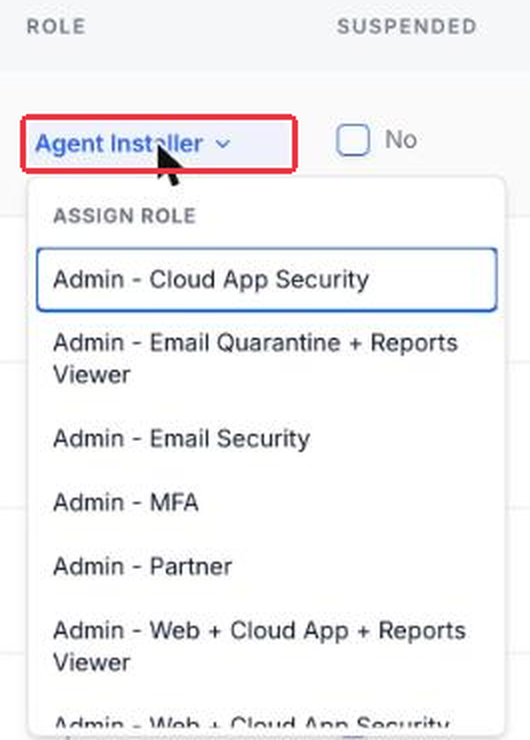
You also choose a role when you add an administrator.
Your account may also have custom roles created by your Service Provider. These appear in the same list.