What's new in the TrustLayer Console: full feature list
- New in the console
- A closer look
- Rule Builder overview
- Web Activity Snapshot for a rule
- Block page templates inside the rule
- Bypass categories inside the agent profile
- Deployment: export, connection quality and agent details
- Stale agents
- Act on any event in Web Activity
- Scheduled reports
- Discover devices
- Still managed in the dashboard
This list covers everything the console adds compared with the dashboard. Both portals use the same login and the same policies, so you can use whichever suits the task. For an overview, see What's new in the TrustLayer Console. Step-by-step guides for each feature are on help.clouduss.com under USS 2.5.
Most of these features have one thing in common: related settings are in one place. A rule shows its own activity, template and history. A profile shows its own bypasses and tags. An event links straight to the rule behind it.
New in the console
Area | Feature | Why it helps |
Home | AI Observability chart: the AI tools in use | Shows shadow AI without running a report |
Home | Unsanctioned SaaS chart | Shows unapproved apps at a glance |
Home | Security Coverage: how many owned modules are active | Spots modules that are paid for but switched off |
Home | Module Usage: seats used against licensed seats | Shows under-deployment and over-use before renewal |
Home | Service status and announcements on the home page | Shows incidents without leaving the console |
Insights | A chart grid you build yourself, saved as named Insight Dashboards, each with its own shortcut in the side menu | Each team keeps the view it needs |
Insights | AI app charts: Top Artificial Intelligence Apps, AI application usage | Tracks AI adoption over time |
Analytics | AI Query: type a question in plain English and it builds the filters | Faster investigations, and staff don't need to learn every filter |
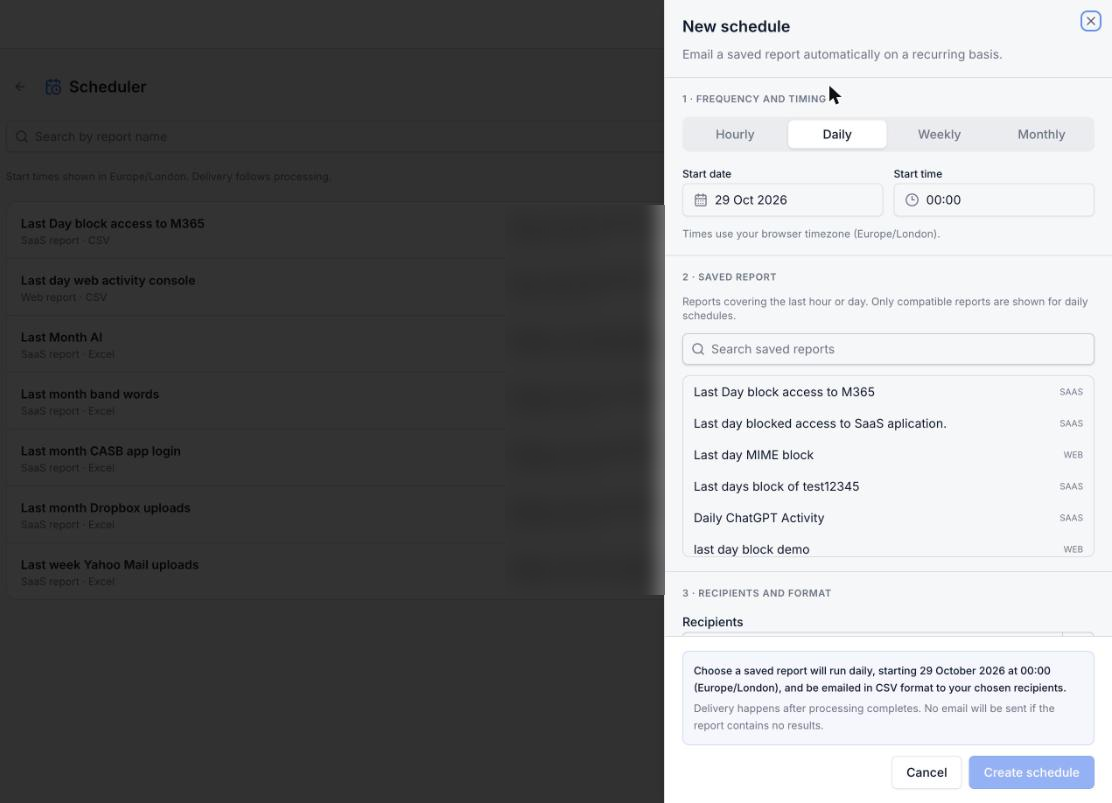
Analytics | Report Scheduler: scheduled reports, which can be active or paused | Regular reports arrive without anyone running them |
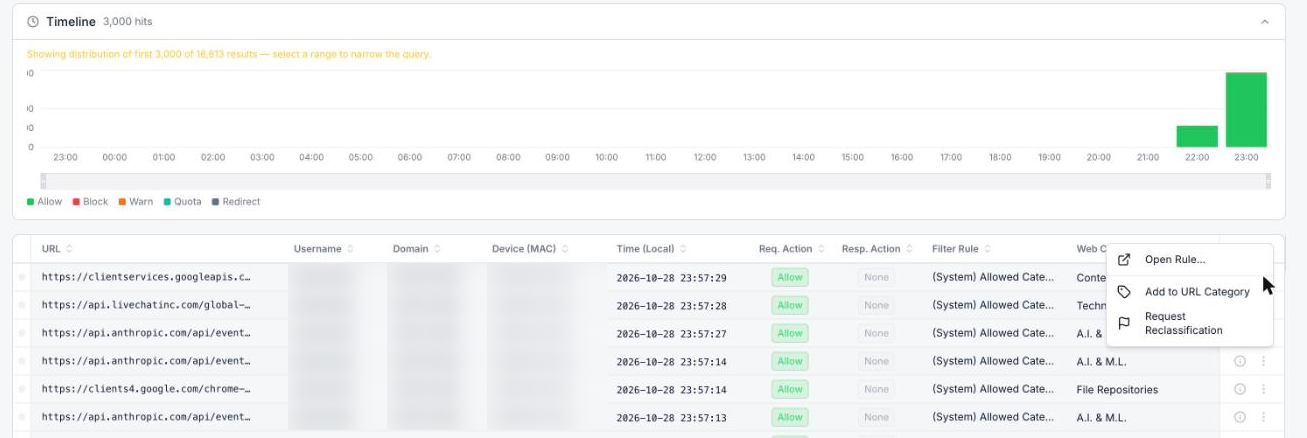
Analytics | Web Activity timeline by action; select a time range to zoom in | Spikes in blocks or warnings are easy to spot and drill into |
Analytics | Actions on any event: Open Rule, Add to URL Category, Request Reclassification | Fix a wrong block straight from the evidence |
Analytics | Relationship Graph, opened from a SaaS Activity report: users, apps, actions and devices, with PNG export | Shows patterns that tables hide |
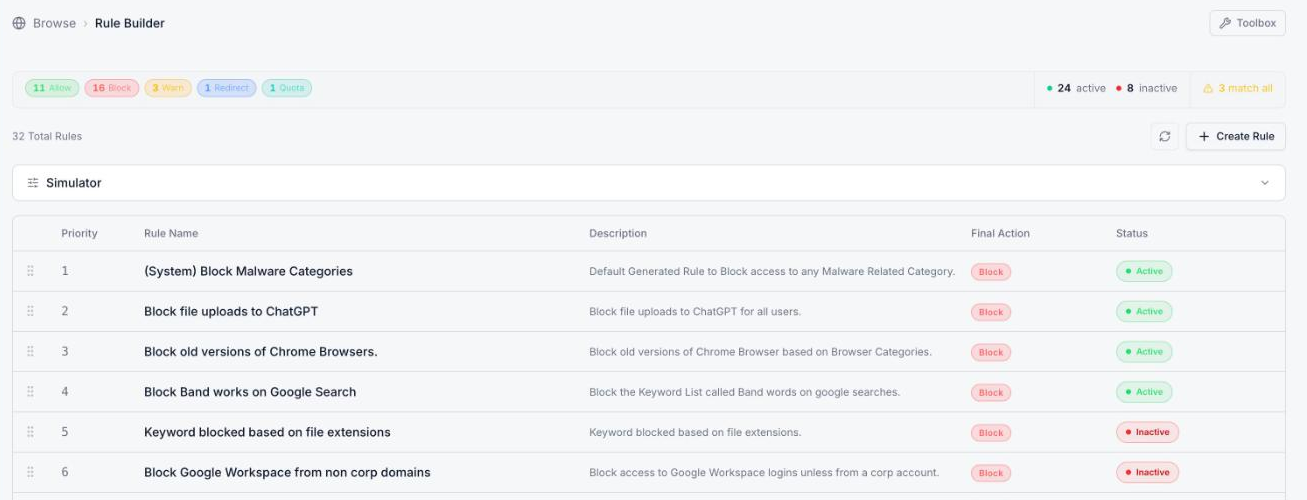
Rule Builder | Overview of rule counts by action, active and inactive counts, and a warning for rules that match everything | Spots risky or unused rules quickly |
Rule Builder | Flow view: each rule drawn from Conditions to Matches to Actions | Easier to check rules and explain them to auditors |
Rule Builder | Version history, with a snapshot saved automatically on every change | See what changed, and roll back with confidence |
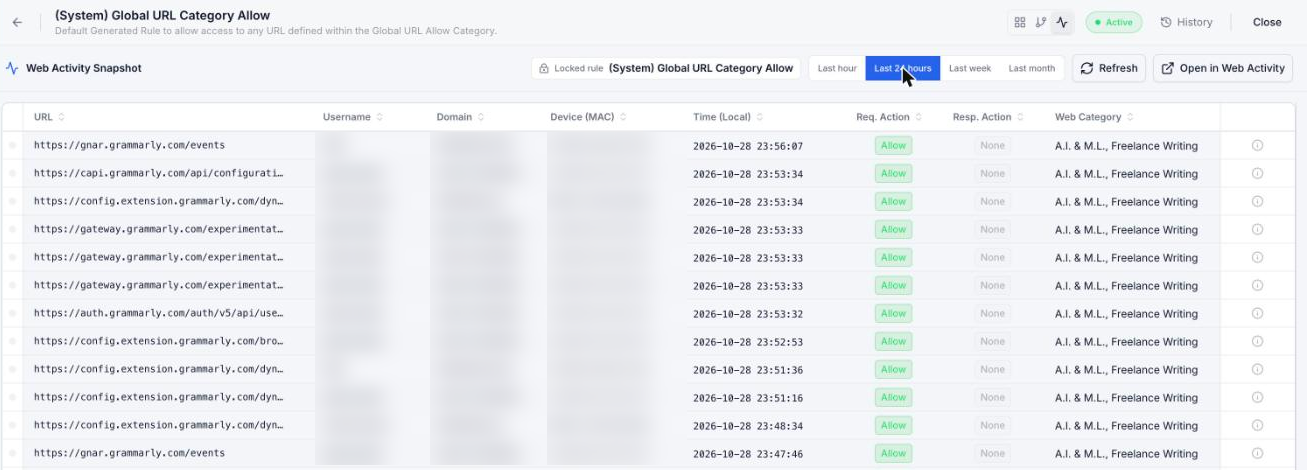
Rule Builder | Web Activity Snapshot for each rule (last hour, 24 hours, week or month) | Check a rule is firing as intended without leaving it |
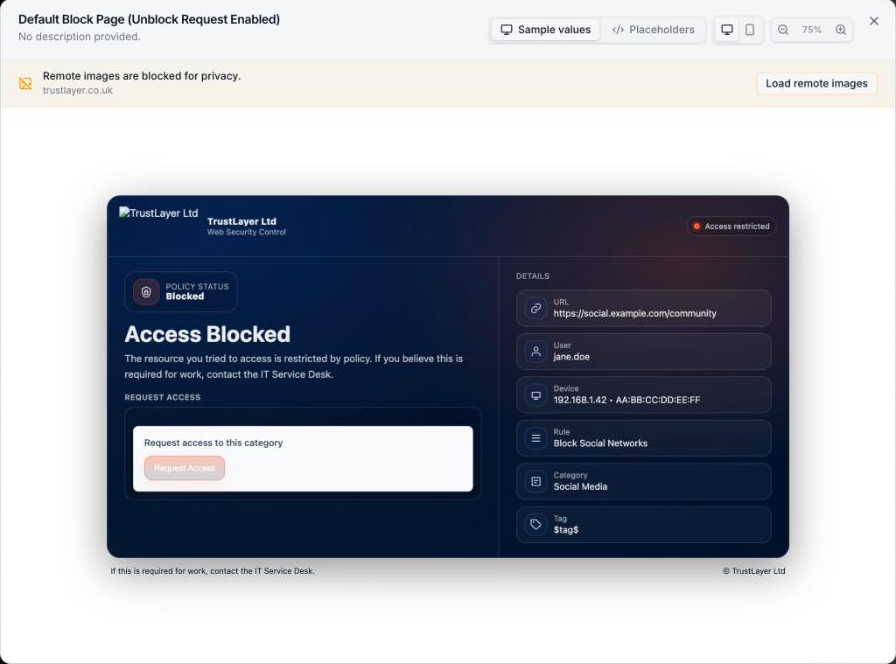
Rule Builder | Preview and pick the block page template from inside the rule | See what users will get before saving |
Rule Builder | SaaS Risk Level match | Write one rule for all high-risk app actions |
Rule Builder | Toolbox (URL Lookup and Quick Add URL) on every Browse page | Check or add a URL wherever you are |
SaaS Catalog | Each app's individual actions, with baseline risk, custom risk and Track/Active settings | Control and rate risk action by action, not just app by app |
Deployment | Filters for Windows, Mac, Gateway, Hosted Gateway and Chromebook | Find the device you need quickly |
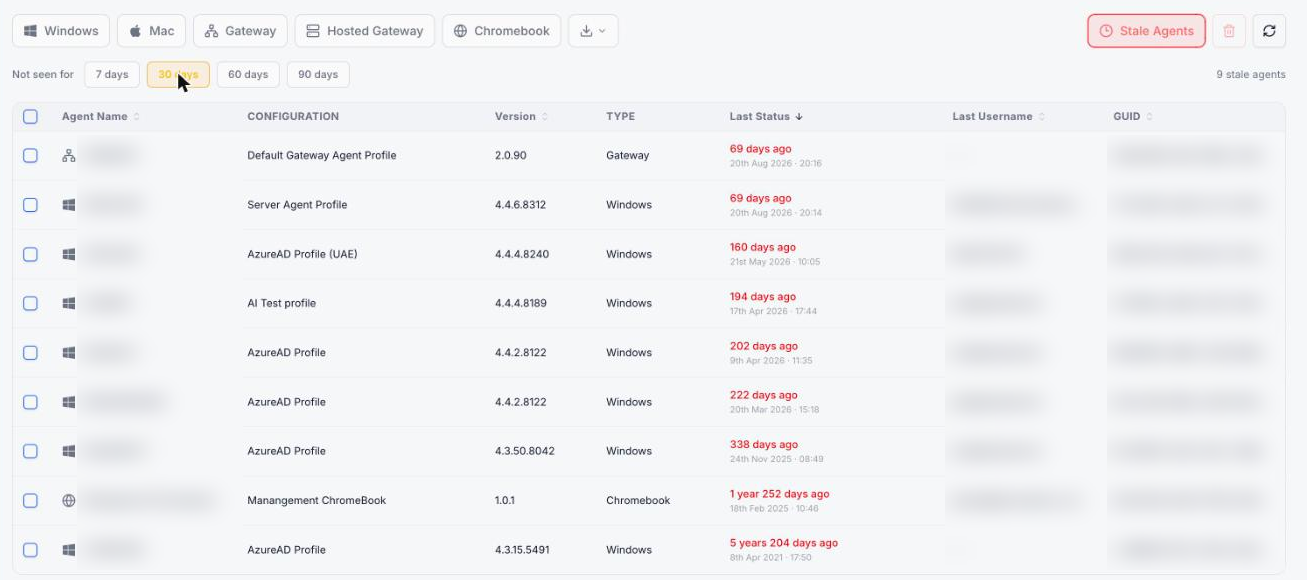
Deployment | Stale Agents view (not seen for 7, 30, 60 or 90 days), with bulk removal | Clean up dead agents and keep counts accurate |
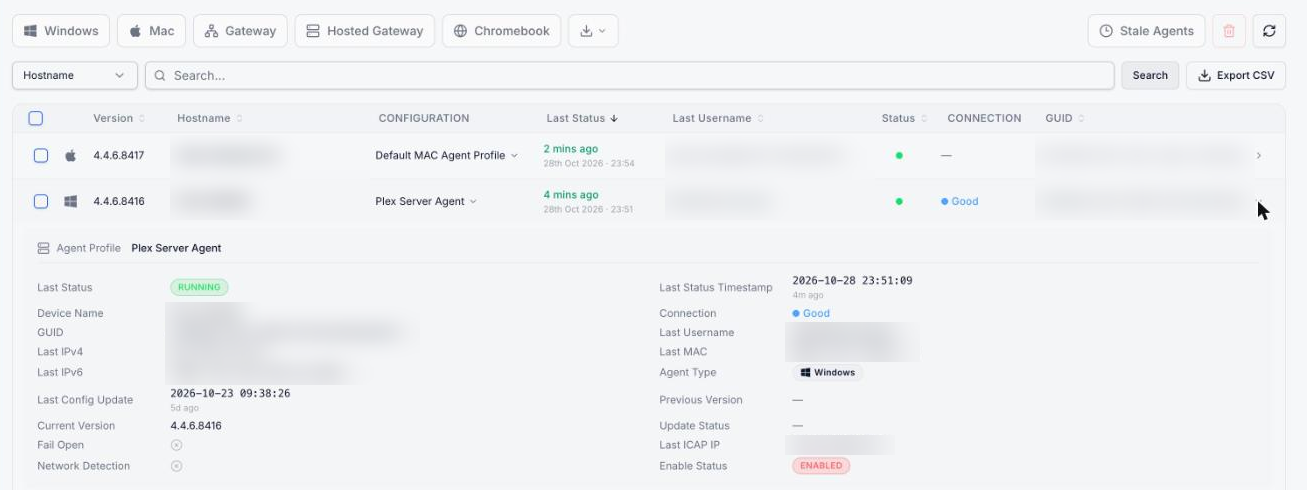
Deployment | Export the deployed agent list as a CSV | Audits, asset registers and licence true-ups |
Deployment | Connection quality for each agent (Excellent, Good or Weak) | Spots devices with poor connections before users complain |
Deployment | Change an agent's configuration profile straight from the list | Move a device to a different profile in one click |
Deployment | Expandable agent details: IP and MAC addresses, last ICAP IP, fail-open and network-detection status, with copy buttons | Everything needed to troubleshoot an agent on one screen |
Agent Configuration | Profiles grouped by platform, with counts and the default profile marked | Clearer view of which profiles exist where |
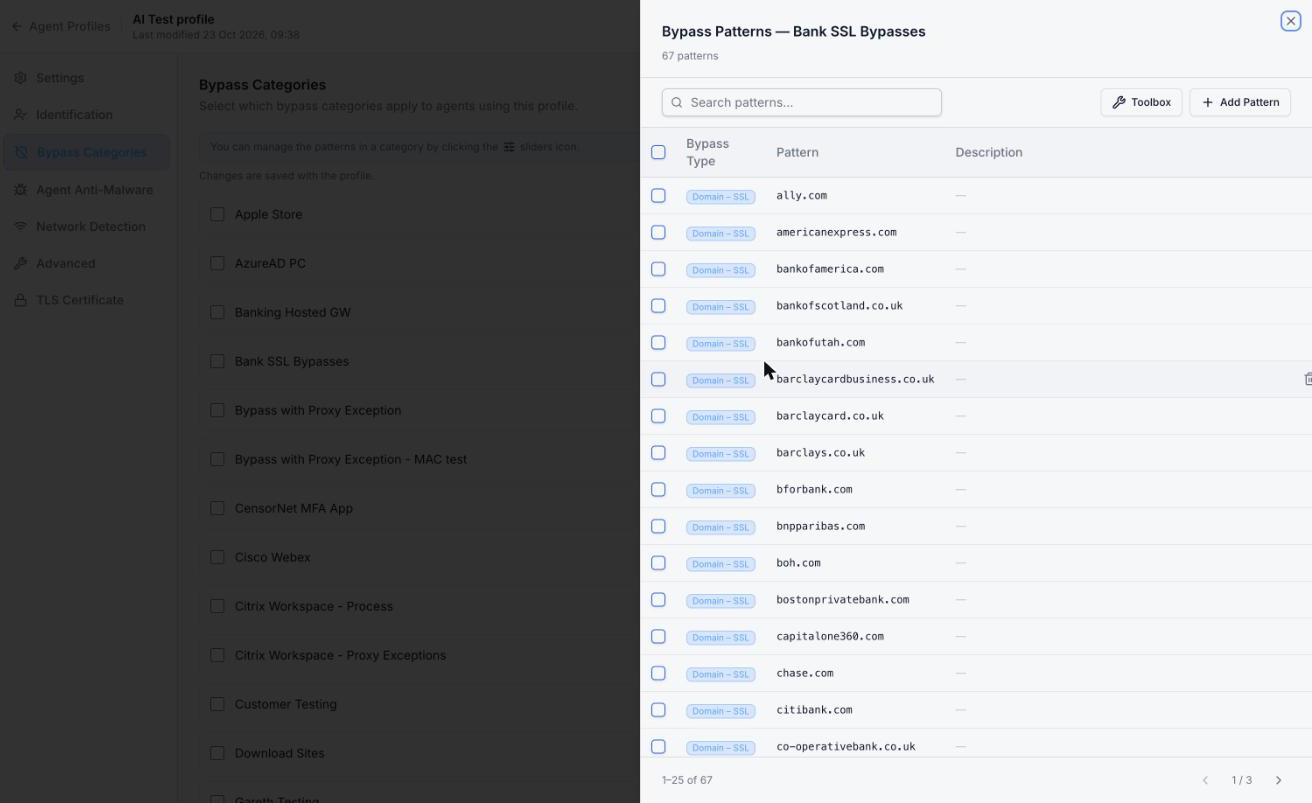
Agent Configuration | Choose bypass categories and edit their patterns from inside the agent profile | No jumping between Bypass and Agent Configuration screens |
Agent Configuration | Create a new web request tag from inside the agent profile | Tag devices as you configure them |
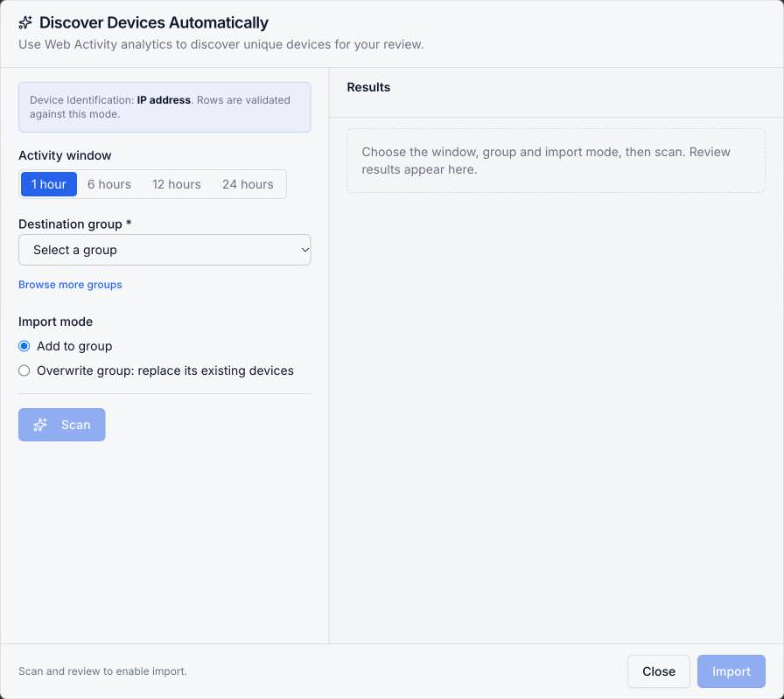
Devices | Discover: builds device groups automatically from recent web activity (1 to 24 hours) | Device groups without typing IP addresses |
General | Open Posture, Compliant Email Archive and Awareness straight from the console menu | One starting point for every TrustLayer service |
General | Live chat with TrustLayer Support from inside the console | Get help without leaving the console or opening a ticket |
General | Dark mode | Easier on the eyes in a security operations centre |
A closer look
Identifying details such as user names, device names and addresses are blurred in these screenshots.
Rule Builder overview
The rule list opens with a count of rules by action, how many are active or inactive, and a warning for any rule that matches all traffic.
Web Activity Snapshot for a rule
Open any rule and switch to the activity view to see the traffic it has matched in the last hour, 24 hours, week or month. Open in Web Activity takes you to the full report.
Block page templates inside the rule
Choose the block page for a rule without leaving it, and preview each template with sample values on desktop or mobile.
Bypass categories inside the agent profile
Pick the bypass categories an agent profile uses, and open any category to search, add or remove its patterns on the spot.
Deployment: export, connection quality and agent details
Filter by platform, export the list as a CSV, check each agent's connection quality, change its configuration profile from the list, and expand a row for its full details.
Stale agents
Show agents that haven't checked in for 7, 30, 60 or 90 days, then select and remove them in bulk.
Act on any event in Web Activity
The timeline shows traffic by action; select a range to zoom in. From any event you can open the rule that made the decision, add the site to a URL category, or request reclassification.
Scheduled reports
Email any saved report hourly, daily, weekly or monthly to the recipients you choose, as a CSV or Excel file.
Discover devices
Build or update a device group from the devices seen in web activity over the last 1 to 24 hours, then review the results before importing.
Still managed in the dashboard
Area | What's managed in the dashboard |
Email Security, SecureMail, and Email Activity reports | |
Identity | IDaaS and Authentication reports |
Web Security | Feature Controls and rule templates (High Risk Sites, Social Quota, Coaching Mode and others) |
Platform | Log Streaming and Role Builder |
The console is an early release, and more features are moving across. Until they do, manage these in dashboard.clouduss.com as usual.